If it seems like every day there’s someone trying to take money from your account or steal your ID, it’s because it is.
Scammers and criminals can make big dollars from your logins, whether it’s working out your passwords to break into more lucrative accounts, or even just to take over your current accounts and spread out, finding ways to break into your friends accounts. It’s a little like a virus, and can hit you in much the same way.
They may even pretend to be you, acting as fake friends and sending a message to get friends to hand over some money, a situation that happens more than you might believe.
Taking over an account isn’t as difficult as it sounds, particularly with so many account breaches and regularly used passwords. While you should only use a password once and ideally should make them complex, the reality is good password hygiene is still a relatively new thing for most people, as are passkeys using either your phone or a physical passkey to store your details and log in to services.
The reality is that scammers can easily find parts of your login details from previous breaches, and that’s bad news for anyone who has inadvertently seen their account details made public, or semi-public in the past.
It may not even be your full current password, but rather your email address, as a scammer tries to reset your password in the hopes that you give them permission to change things.
A spate of Instagram password resets is making waves, hitting the emails of regular users as individuals look to break in and change accounts, or even convince you with legitimate-looking emails. What’s going on?
Real Instagram reset emails
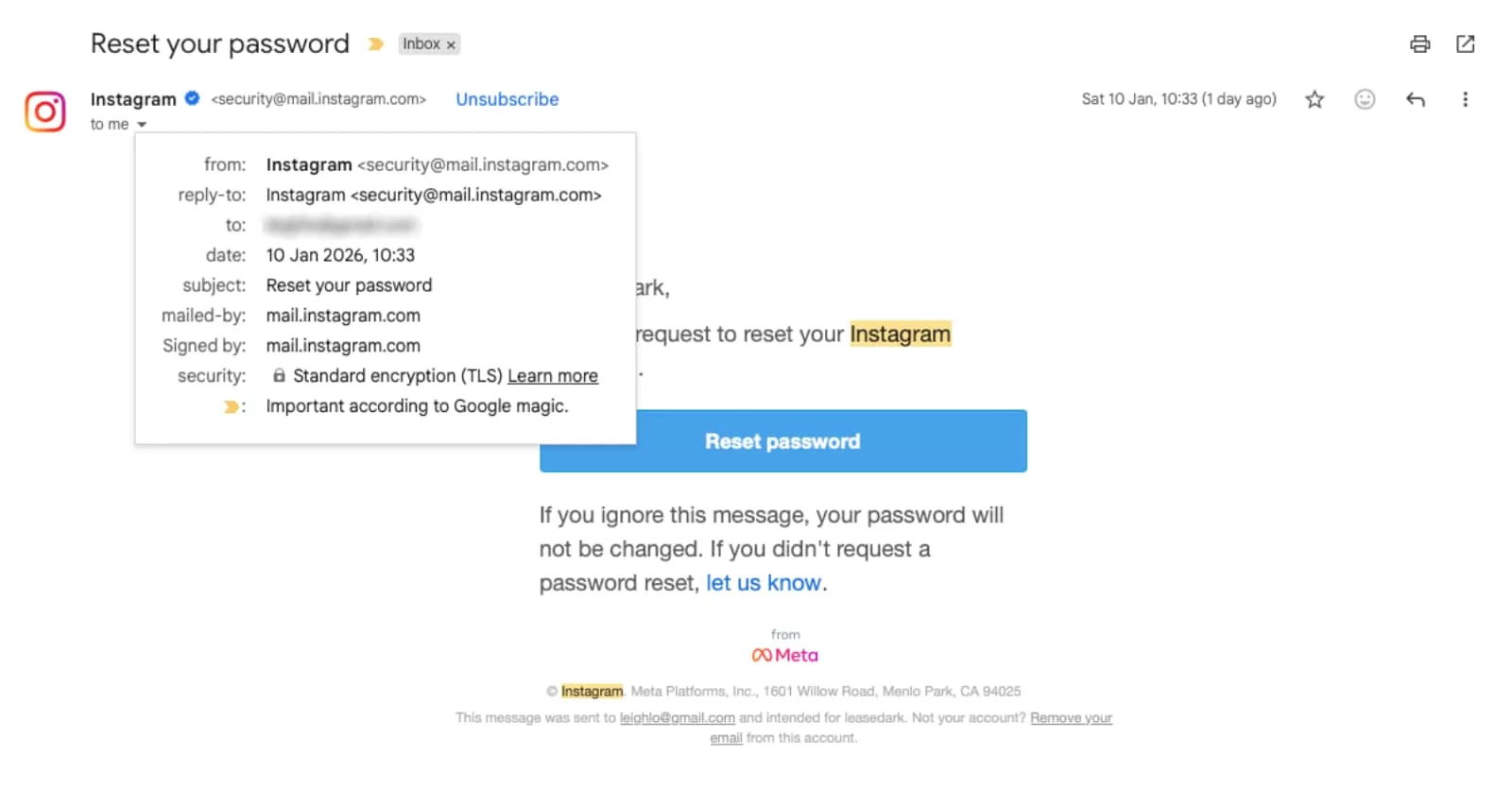
It doesn’t take much to trigger a password reset on Instagram (or other services). Every service offers a reset form to work from; you simply throw in your email address, phone number, or username, and the system will send an email asking for you to reset the password.
For a legitimate case of needing a password reset, it’s handy.
But if a scammer is trying to break in, it’s a different thing altogether. When they test the waters, the attempt is to change a password so you can’t log in ever again, and so they can take over and do something else.
That could be to spread out and catch more victims, to share something to make them money, or even just to ransom your own account back to you at a later date.
It’s worth noting that when a scammer uses the official password reset mechanism, they haven’t broken into your account. This isn’t immediate access for a scammer, and is more like a way to see if you will let them finish the job.
They may have access to your email account, but they probably don’t. But then again, they don’t need to. Once the change request is triggered, they simply need for you to click on the link, a process that can make their request final.
If you receive one of these emails without authorising it in the first place, it makes it an ideal time to check your email password and see if it’s solid.
The last thing you want is a criminal gaining access to your email, and locking you out.
Fake Instagram reset emails
It’s not just real password change emails you have to deal with, but also the fake ones. You know the type: fraudulent emails made by scammers and criminals intent on breaking your account open and owning it.
To do that, scammers may send emails that look real, but miss out on the obvious details that a legitimate email comes with. Remember that there’s more to an email than simply its text and how it appears in your inbox.
Scammers can’t use the real www dot domain names that the real service uses, and can only pretend to be Instagram, Facebook, or anything else. So while they can pretend with the same language and pictures, they can’t make their emails come from the official website and its domain, missing out on sender address details such as instagram.com or facebook.com and the like.
It means if you open up where the email comes from, you’ll be able to tell pretty quickly whether the scam attempt is coming from a different place, and whether it’s a fake email.
What can you do?

The problem is possibly that many of the emails being triggered as of 2026 aren’t from fake Facebook or fake Instagram sites, but rather password reset emails that look real. They come from Instagram good and proper, and that can make it seem like you need to click.
But you don’t. You do not need to click on a single button or message inside these emails unless you have triggered the password change request yourself.
Clicking to approve a change will almost definitely cede your account to someone else, and make it difficult to get it back.
As such, the most important thing you can do is not to click on a button approving that password change, but it’s not the only thing.
Step up your security on the service
If you’ve received one of these emails, you can usually ignore it and life will be fine. But if you want to give yourself more breathing room, consider diving into your account settings and authorising some extra features.
For instance, Instagram offers support for multifactor authentication, meaning you can easily connect it with your phone, a passkey, or even an authentication app such as Google Authenticator, and make sure that anyone attempting to log in with your details doesn’t have the extra step in your possession.
Two-factor and other similar forms of security are a very easy step you can add that means password reset emails like these are largely powerless because there’s still an extra step to force a successful login.
But seriously, don’t click on a reset email unless you authorised it
Regardless of whether you received a fake or a real reset email, the simple truth is that you should never click on a social reset link unless you authorised it in the minute or two before.
If you’re resetting your social email or password, that’s fine. Hover over the link and make sure it’s legit, and then click to reset the account.
But when scammers try to force a reset — or fake it, as they can — they’re essentially baiting you to authorise a password change, and let them take over the account.
When one of these unwanted password change emails comes in, the best you can do is ignore it, and opt to not click on any of the buttons.
In the case of Instagram, Meta even notes that if you didn’t request the change, you can safely ignore the message, specifically stating:
If you ignore this message, your password will not be changed. If you didn't request a password reset, let us know.
Simply put, just ignore these messages. Scammers will keep trying, and you’ll keep on keepin’ on, ignoring the attempts.
Instagram even took to X to confirm largely what had triggered the mass amount of password reset attempts, patching a part of its systems that allowed others to trigger resets.
While these things can happen, it highlights the importance of keeping those password standards up, and also keep multi-factor (2FA) switched on, so that even if they make it through one level, they won’t make it through the entire thing.
And if the worst does happen, and an Instagram account is broken open, consider checking out Instagram’s resources for hacked accounts, which may help you get your account back.
Updated to include information from Instagram.